
QuickBooks Online for Landlords
Managing rental property finances becomes complicated as soon as you have multiple tenants, maintenance costs, and security deposits to track. Many landlords start with spreadsheets and bank statements, but those systems quickly break down. Some landlords use expensive specialty software marketed to property managers overpaying for features they never use.
QuickBooks Online is the best accounting software for small landlords.
Using QuickBooks Online allows landlords and rental property businesses to organize their finances, track rent payments, manage security deposits properly, and even collect rent automatically from tenants.
This guide explains how landlords can use QuickBooks Online to manage rental properties and simplify their accounting.
Why Landlords Need Proper Rental Property Accounting
Rental property owners must track several financial activities at the same time:

Monthly rent payments
Tenant security deposits
Property maintenance and repairs
Insurance and property taxes
Utilities and operating expenses
Profitability for each property
Without a structured accounting system, it becomes difficult to know:
Which properties are profitable
Whether rent payments are being collected on time
How much money is being spent on maintenance
Whether security deposits are handled properly
This is why many landlords use QuickBooks Online as their accounting system.
Use Separate Bank Accounts for Rental Property Finances
One of the most common mistakes landlords make is mixing personal finances with rental property income and expenses.
A better approach is to use a dedicated business banking system.
Many rental property owners use Relay Financial, a free online banking platform designed for small businesses that integrates directly with QuickBooks Online.
Relay allows landlords to create multiple bank accounts for organizing rental property funds.
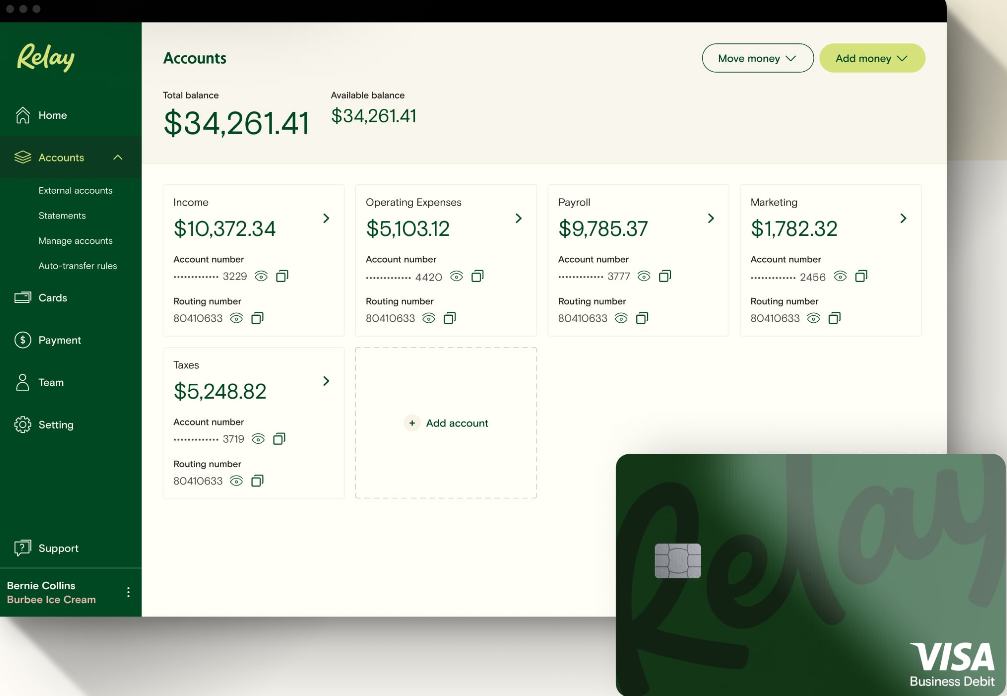
Common account structure for landlords:

Rent Collection Account
Security Deposit Holding Account
Property Maintenance Account
Tax Savings Account
Benefits include:
No monthly banking fees
Automatic bank feeds into QuickBooks
Clear separation of rental funds
Easy payments to contractors and vendors
Keeping rental finances separated makes bookkeeping easier and reduces tax problems.
How to Set Up Rental Properties in QuickBooks Online
The first step is organizing properties and tenants correctly inside QuickBooks.
The most common structure is Customers and Sub-Customers.
Example structure:
Customer: Oak Street Apartments

Sub-Customers (Tenants):
Unit 1 – John Smith
Unit 2 – Sarah Davis
Unit 3 – Michael Brown
This structure allows landlords to:
Track rent payments by tenant
Track income by property
Run financial reports for each building
If you own multiple buildings, create one customer per property and sub-customers for each tenant.
Create Rent and Security Deposit Items
Next, create products or services that represent the payments tenants make.
In QuickBooks: Sales → Products & Services → New
Create items such as:
Monthly Rent
Type: Service
Income Account: Rental Income
Late Fee
Type: Service
Income Account: Late Fee Income
*Security Deposit
Type: Service
Account: Security Deposit Liability
*Security deposits should never be recorded as income. They should be recorded in a liability account because the money belongs to the tenant until the lease ends.
How to Track Security Deposits Correctly
Security deposits must remain separate from rent income.
Create a liability account called something like: Security Deposits Liability
When a tenant pays a deposit:
Create a Sales Receipt
Select the Security Deposit item
Deposit the money into the security deposit bank account

Many landlords keep security deposits in a separate bank account within Relay Financial to make refunds easier when tenants move out.
When the lease ends, the deposit can either be:
Refunded to the tenant
Applied to damages or unpaid rent
At that point the liability account is cleared.
Track Rental Property Expenses
Rental property businesses incur a wide variety of expenses that should be categorized properly.

Common expense categories include:
Repairs and Maintenance
Property Taxes
Insurance
Utilities
Lawn Care or Snow Removal
Cleaning and Turnover Costs
Contractor Payments
Advertising for New Tenants
Tracking these costs properly allows landlords to understand the true profitability of each property.
Track Profitability by Property
If you own more than one rental property, it is important to track income and expenses separately.
QuickBooks Online allows this using Classes.
Example class structure:
Oak Street Apartments
Pine Avenue Duplex
Maple Court Rentals
Once classes are assigned to transactions, landlords can run a Profit and Loss by Class report.
This report shows:
Rent collected per property
Maintenance costs per property
Net profit for each building
This helps landlords understand which properties are performing best.
Record Rent Payments Using Sales Receipts
When tenants pay rent immediately, the easiest way to record the payment is with a Sales Receipt.
A Sales Receipt records both the payment and the income at the same time.
Example:
Tenant: John Smith – Unit 1
Item: Monthly Rent
Amount: $1,500
Deposit To: Rent Bank Account
This keeps rent records organized and tied to the correct tenant.
Automatically Collect Rent from Tenants
QuickBooks also allows landlords to collect rent automatically using QuickBooks Payments.
Tenants can pay using: Bank transfer (ACH), Credit / Debit card, PayPal or Venmo
Landlords can send tenants an invoice, secure payment link or set up recurring automatic rent payments.
Benefits include:
Automatic rent collection
Faster deposits
Reduced late payments
No need to handle checks
Funds are typically deposited into your bank account within one to two business days.
Set Up Automatic Monthly Rent Payments with QuickBooks Payments
Because rent is paid every month, QuickBooks allows landlords to automate the process.
By creating a Recurring Sales Receipt and setting the interval to every 30 days you can automate rent collection. QuickBooks will automatically charge the tenant each month once they authorize autopay.
This reduces the time landlords spend collecting rent.
Financial Reports Landlords Should Review Each Month

QuickBooks Online provides several reports that help landlords manage their rental properties.
Important reports include:
Profit and Loss by Class Report: Shows income and expenses for each rental property.
Income by Tenant Report: Shows rent collected from each tenant.
Expense by Vendor Report: Shows how much is being paid to contractors and service providers.
Cash Flow Report: Shows how much cash the rental business is generating.
Reviewing these reports regularly helps landlords identify financial problems early.
Common Accounting Mistakes Landlords Make
Many rental property owners accidentally create accounting issues by:

Recording security deposits as income
Mixing personal and rental finances
Not separating properties in reports
Failing to track maintenance expenses properly
Manually collecting rent instead of automating payments
Setting up QuickBooks correctly from the beginning prevents these problems.
How an Accountant Can Help Rental Property Owners
While QuickBooks Online is powerful, many landlords struggle with:
Correct chart of accounts setup
Security deposit tracking
Property-level reporting
Automated rent collection
Preparing financial reports for taxes
A professional QuickBooks setup ensures the system is structured correctly so landlords can manage their properties with confidence.
Need Help Setting Up QuickBooks for Your Rental Properties?
If you own rental properties and want a simple system to track rent, expenses, and security deposits, professional setup can save you hours of work.
A properly configured QuickBooks system can:
Automatically collect rent from tenants
Track income and expenses by property
Keep security deposits organized
Provide clear financial reports for tax season
Tullis Consulting & Financial Services LLC helps your business build the financial systems and operational processes needed to scale profitably. Schedule a free consultation to discuss how to organize your rental property accounting.